Mastering the Roundhand Font for Professional Embroidery Results
There is a distinct elegance to seeing a name stitched in flowing script on a wedding gown, a monogrammed towel, or a custom jacket. The Roundhand Font captures this timeless aesthetic perfectly, offering a high-quality embroidery design that bridges the gap between digital typography and tactile textile art. However, many creators assume that purchasing a font file guarantees a flawless stitch-out. In reality, the difference between a stunning, personalized piece and a tangled mess often lies in how you prepare, test, and apply the design rather than just the font itself.
Whether you are a hobbyist looking to add dates to baby blankets or a small business owner creating branded apparel, understanding the nuances of this machine embroidery design is essential. This guide will walk you through the common pitfalls associated with using script fonts in embroidery and provide practical strategies to ensure your final product looks as professional as intended.
Understanding the Unique Nature of Script Embroidery
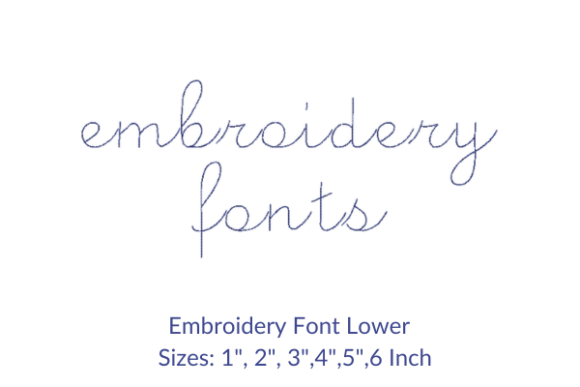
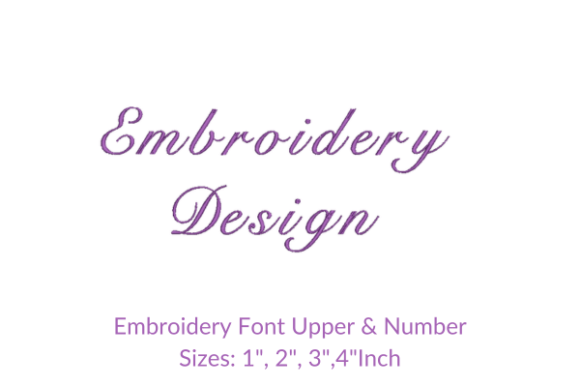
The Roundhand Font is designed to mimic the fluid strokes of calligraphy, characterized by varying line widths, sharp points, and sweeping curves. While beautiful, these features present specific challenges when translated into thread. Unlike block letters, which rely on solid fills, script fonts depend heavily on satin stitches (columns of parallel threads) to create their shape. If the angle or density of these stitches is not managed correctly, the design can lose its definition, resulting in a blobby or uneven appearance.
People are drawn to this font because it adds a personal touch that standard sans-serif or serif fonts cannot match. It transforms a simple garment into a bespoke item. However, the very details that make it attractive—thin tails and tight loops—are also the most prone to errors if the wrong settings are used. Before you download or buy, it is crucial to recognize that this is not a "set it and forget it" design; it requires attention to detail during the digitizing and stitching phases.
Common Mistakes That Compromise Quality
One of the most frequent errors I see beginners and even some professionals make is ignoring the size constraints of script fonts. When you scale a Roundhand Font design too small, the intricate details vanish. The thin lines become so narrow that the needle struggles to pass through without breaking the thread, or the stitches overlap, causing puckering. Conversely, scaling it too large without adjusting the stitch count can lead to gaps in the satin columns, leaving the fabric visible where it should be covered.
Ignoring Fabric Compatibility
Another overlooked detail is the interaction between the font and the base material. A design that looks perfect on a stabilizer might fail miserably on a stretchy jersey or a heavy denim. Script fonts require a stable foundation. If you attempt to embroider a long quote in Roundhand on a flimsy cotton tee without adequate backing, the tension of the machine will pull the fabric, distorting the graceful curves of the letters. The result is a warped message that looks unprofessional and may even damage the garment.
Neglecting File Format Verification
This machine embroidery design comes with multiple embroidery file formats, which is a significant advantage. However, simply having the files is not enough. Many users download a package containing .PES, .DST, .JEF, and other extensions but do not verify which format their specific machine requires before starting. Using an incompatible file can cause the machine to misread stitch directions or densities. Even if the machine accepts the file, converting it through third-party software without checking the settings can alter the underlay structure, leading to poor coverage or excessive thread consumption.
How These Errors Impact Your Work
The consequences of these mistakes go beyond a single ruined project. For entrepreneurs and freelancers, a failed stitch-out means wasted materials, lost time, and potentially dissatisfied clients. If you promise a client a personalized gift with their child's name in a beautiful script, and the final product arrives with broken threads or illegible text, it damages your reputation more than a simple delay would.
Furthermore, efficiency suffers when you have to re-stitch designs repeatedly. Thread waste adds up quickly, especially when working with specialty metallic or variegated threads often used with elegant scripts. Poor planning regarding file formats and sizing leads to frustration and increased costs, turning a creative endeavor into a logistical nightmare. For educators teaching embroidery classes, these errors can discourage students who believe they lack the talent, when in fact, the issue was simply a technical oversight in preparation.
Practical Strategies for Success
To avoid these pitfalls, start by treating every new design as a test run. Before committing to your final fabric, always perform a test stitch on a scrap piece of the same material you intend to use. This allows you to check the tension, the stability of the backing, and the legibility of the Roundhand Font at your desired size. Adjustments to hoop placement and stabilizer type can be made easily during this phase.
Optimize Your Sizing
When writing names, dates, or quotes, adhere to a minimum width recommendation for script fonts. Generally, keep individual characters no smaller than 0.5 inches in height to maintain clarity. If you need to fit a long quote, consider breaking it into two lines or increasing the spacing between words rather than shrinking the font. Most modern embroidery software allows you to adjust the stitch density manually. If the design appears too loose, slightly increase the density; if it feels stiff, reduce it slightly to allow the fabric to breathe.
Select the Right Stabilizer
Do not skimp on stabilizers. For a high-quality embroidery font like Roundhand, a cut-away stabilizer is often superior to tear-away for knits, as it provides permanent support against the stretching forces of the satin stitches. For woven fabrics, a medium-weight tear-away or water-soluble topping can prevent the thread from sinking into the weave, keeping the script crisp and raised.
Evaluating Your Purchase and Workflow
Before making a decision to purchase or download this design, review the preview images carefully. Look for close-ups of the letter connections and the tail ends. Ensure the digitizing includes proper underlay stitches, which act as a foundation for the top layer. Without a good underlay, the satin stitches may shift, causing the elegant curves of the Roundhand Font to look jagged.
Additionally, confirm that the package includes the specific file format your machine uses. While conversion tools exist, native files always yield the best results. Check the documentation for any specific instructions regarding thread types or needle sizes recommended by the designer. Using a universal needle instead of an embroidery-specific one can cause skipped stitches, particularly in the tight turns of script letters.
Final Thoughts on Personalization
Using the Roundhand Font is an excellent way to elevate your embroidery projects, adding a layer of sophistication that generic fonts cannot achieve. By respecting the technical requirements of script embroidery—proper sizing, adequate stabilization, and correct file management—you can ensure that your personalized designs stand out for all the right reasons. Whether you are creating a keepsake for a loved one or building a portfolio for your business, taking the time to prepare correctly will save you frustration and result in work you are proud to display.